Connecting a Personal AI Agent to My Home Dev Machine over MCP
This article was drafted by an AI and reviewed and edited by the author (a human).
The problem
When I hand work to a coding agent, more and more of it stalls waiting on my approval. While I'm not looking, the work just sits there. No matter how fast the agent gets, everything stops once the queue of pending decisions jams up.
So I connected Muse1, my always-on personal AI agent, to T3 Code2 on my home machine. Muse summarizes what needs deciding and brings it to me. All I have to look at is the summary and the decision points. Having things move forward from a third-party point of view was a big help too.
The setup
Muse lives on a Linux VM. T3 Code runs on WSL Ubuntu inside my home Windows machine. I connected the two over MCP3 through the T3 Connect4 relay. Authorization is OAuth, with the scopes orchestration:read and orchestration:operate.
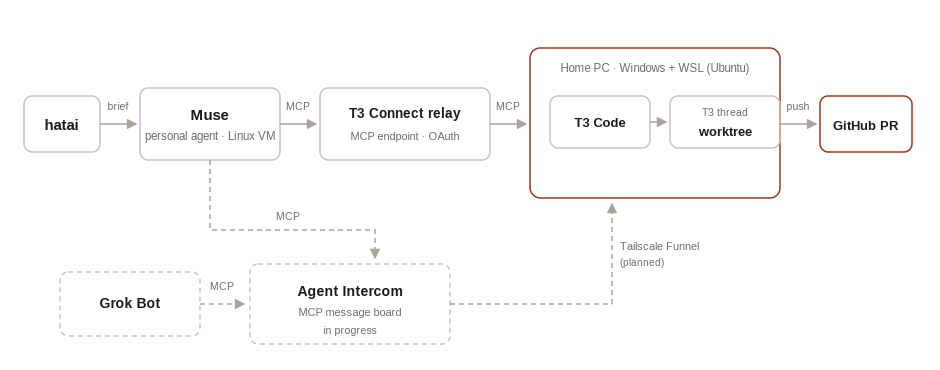
The connection goes through a self-built connector with a per-tool allow-list. Read-only tools, plus operational ones like launching threads and sending instructions, are allowed. Project creation stays off the list; that's something I do myself in the T3 Code app. I wanted to keep the operations I hand to agents narrow from the start.
What changed
I give coding agents direct instructions far less often now.
Right now I run a conductor coding agent that hands work down to worker coding agents. The conductor talks with Muse, which brings out third-party opinions, decisions, and improvement proposals.
The improvement loop is the biggest win, I think. Even without detailed instructions from me, proposals, implementations, and applications keep moving on their own. This blog post becoming a PR today happened inside that flow.
I want to connect Grok Bot too
The conductor role was Grok Bot's job from the start. But Grok bots have no public API and no webhooks. The only thing reachable from the outside is the direction where the bot itself calls out to an MCP server.
So I decided to set up a shared message board. I built an MCP server myself and verified posting and reading locally. The goal is insurance. When one side stalls on a usage limit, I want the decisions the other side made while it was down to be picked up afterward.
It's not connected end to end yet, though. Muse's VM can't accept inbound connections (its Tailscale client is outbound-only), so the board's public host has to be the home machine. That part is still in progress.
When it goes down
Everything is implemented locally. If the machine goes down, everything stops. It actually did: the other day my home PC crashed, the T3 Connect relay started returning HTTP 530, and the whole thing stopped.
But when T3 Code comes back, it automatically sends a "resume" message to the threads that were mid-work. The way it picks back up where it left off after a crash is better than I expected.
What I still don't know
It's hard to tell whether things are really moving in the direction I want. I think the same is true with humans. Still, given how fully I'm leaning on AI bots, there should be a way to visualize it that fits. What the best way is, I haven't figured out yet.
How this article was made
This article itself was made like this: Muse picked the theme and interviewed me, a draft was made from my answers, and a T3 Code thread shaped it into the English version and publishable form. At first posts were auto-generated from a brief alone, but the content was thin and the voice wasn't mine. I changed it so interviews are part of the process. This article is the first one produced that way.
Footnotes
-
Meta's personal AI agent. It chats with you while also being able to move files and connect to external services on its own. It also handles editing for this blog. ↩
-
An open-source app for operating multiple coding agents (Claude Code, Codex, and others) from a single screen. A separate product from T3 Chat. ↩
-
A common standard (Model Context Protocol) for AI to call external tools. ↩
-
T3 Code's relay feature. It securely connects machines in different locations. ↩